New WhatsApp Chat Themes in 2026: 5 Exciting Styles You’ll Love 🎨
New WhatsApp Chat Themes in 2026: 5 Exciting Styles You’ll Love 🎨
-
2Views
-
21st September, 2026
New WhatsApp Chat Themes in 2026: How to Get 5 New Styles
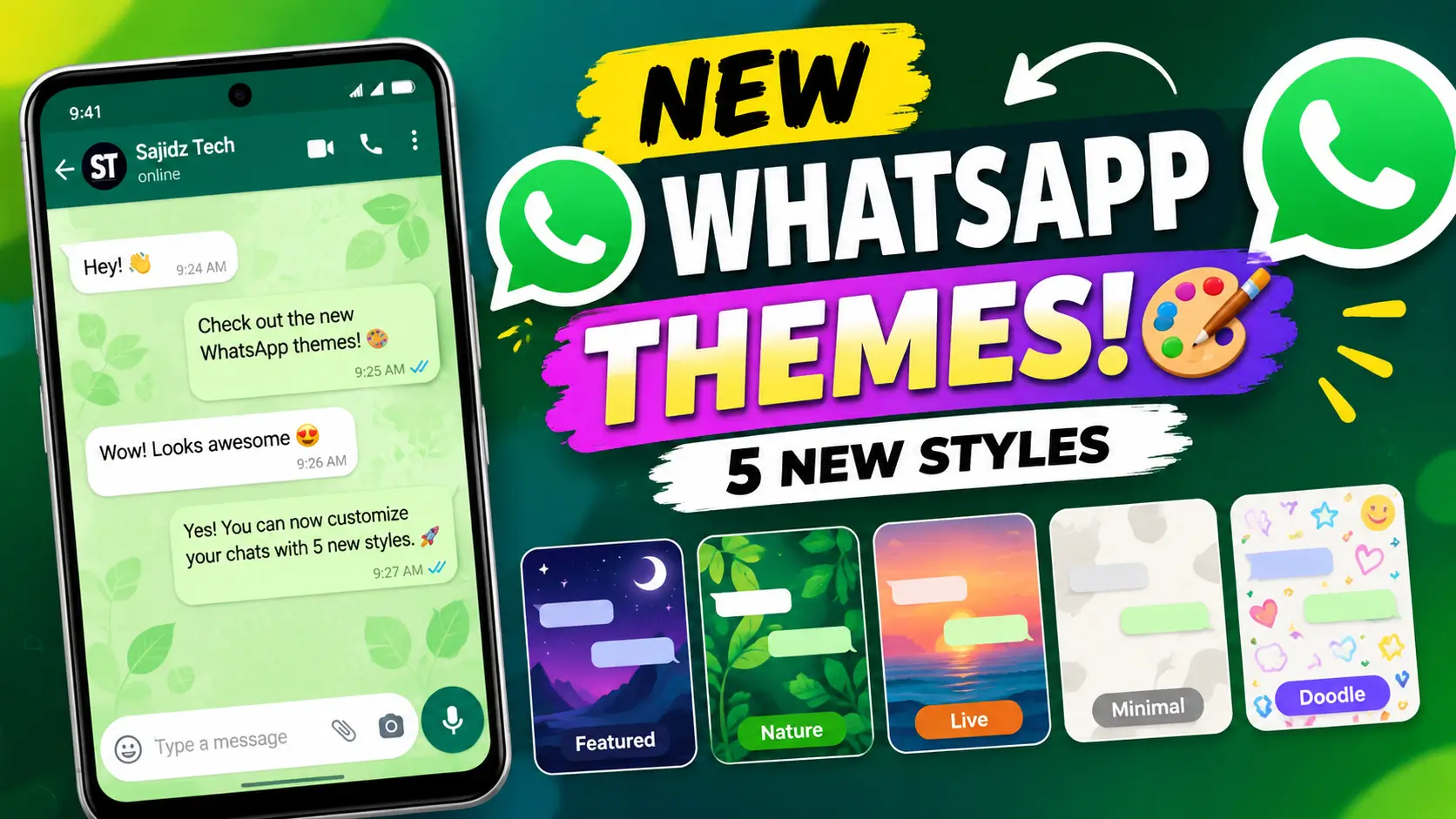
WhatsApp is getting a fresh customization update with new WhatsApp chat themes that give Android users more ways to change the look of their conversations. The latest theme experience introduces five categories: Featured, Nature, Live, Minimal, and Doodle.
In this guide, I’ll show you how to find the new WhatsApp chat themes, how the new categories work, what has changed with WhatsApp wallpapers, and what to do if you don’t see the new options on your phone yet.
Important: WhatsApp is rolling out these changes gradually, so the new theme categories may not be available on every account immediately.
What Are the New WhatsApp Chat Themes?
The new WhatsApp chat themes are part of an updated customization experience that gives users more ways to personalize the appearance of their conversations.
Instead of simply choosing a color or wallpaper, the updated experience organizes themes into different categories. According to current reporting, the five categories being introduced on Android are Featured, Nature, Live, Minimal, and Doodle.
The new system can also automatically select suitable chat bubble colors based on the theme and wallpaper, helping the messages remain readable while matching the overall design.
The update is particularly interesting for people who like customizing their messaging apps because you can quickly change the visual style of your conversations without manually creating every part of the design.
What Are the 5 New WhatsApp Theme Categories?
1. Featured
The Featured category is designed to highlight selected theme styles from the available collection. It gives users a quick way to find some of the most noticeable designs without browsing through every category.
2. Nature
Nature themes are focused on outdoor-inspired designs such as landscapes, greenery, mountains, and other natural scenes. These themes can give your WhatsApp conversations a more colorful and scenic appearance.
3. Live
The Live category is particularly interesting because it can include wallpapers with subtle animated effects. The animations are designed to move slowly in the background instead of distracting you while reading or sending messages.
4. Minimal
If you prefer a cleaner interface, the Minimal category is designed around simpler backgrounds and less visual detail. This can be useful if you want your conversations to look modern without too many colors or patterns.
5. Doodle
The Doodle category uses playful illustrated patterns and colorful designs. It is aimed at users who want their WhatsApp chats to have a more fun and expressive appearance.
How to Get the New WhatsApp Chat Themes
If the new WhatsApp chat themes have reached your account, you can check the chat theme settings directly inside WhatsApp.
- Open WhatsApp on your Android phone.
- Open Settings.
- Go to the section for Appearance or chat customization.
- Tap Default chat theme.
- Look for the available theme categories.
- Select a theme that you want to try.
- Preview the appearance and apply the theme.
The exact menu names and layout can vary depending on your WhatsApp version and device. WhatsApp’s official Help Center currently documents the general chat-theme system, including the ability to change themes, wallpapers, and chat bubble colors.
You can also watch our step-by-step video here:
How to Get New WhatsApp Chat Themes in 2026
How to Change the WhatsApp Theme for All Chats
WhatsApp allows you to use a default chat theme across your conversations. This means you can customize the general appearance of your chats instead of changing every conversation individually.
Open WhatsApp settings and look for the Default chat theme option. From there, you can select an available theme and apply it to your chats.
WhatsApp’s official instructions also explain that themes can change both the wallpaper and chat color. Depending on your available options, you can also customize the wallpaper or chat bubble color separately.
Can You Change the Theme for Only One WhatsApp Chat?
Yes. WhatsApp also supports customization for individual conversations.
Open the conversation you want to customize and tap the chat name. Look for the Chat theme option and select your preferred design.
This is useful if you want different conversations to have different appearances. For example, you could use a colorful theme for a family group while keeping a simple Minimal-style design for work conversations.
WhatsApp’s official Help Center provides instructions for applying a theme to a specific chat as well as changing the default theme for all chats.
What’s New About WhatsApp Wallpapers?
The theme update is not limited to the new WhatsApp chat themes. WhatsApp is also reorganizing its wallpaper selection into separate categories.
This makes it easier to choose a wallpaper independently rather than always applying an entire chat theme.
Current reporting indicates that WhatsApp is introducing additional wallpaper categories, including options such as Vibrant and Gradient, while Live wallpapers can be identified by a small badge.
This gives users more flexibility because you can choose a complete theme or customize parts of the chat appearance separately.
What If You Don’t See the New WhatsApp Chat Themes?
Don’t worry if the new WhatsApp chat themes don’t appear on your phone yet.
WhatsApp frequently rolls out new features gradually. Some features may initially appear for beta testers or a limited number of users before becoming available to a larger audience.
Current reports indicate that the new Android theme experience is being rolled out gradually, meaning two people using WhatsApp on similar phones may not necessarily see the same options at the same time.
If you don’t see the new themes, try these steps:
- Update WhatsApp from the Google Play Store.
- Restart WhatsApp after updating.
- Check your chat appearance settings again.
- Make sure you are using the latest available version.
- Wait for the feature to reach your account if it is still being rolled out.
Avoid downloading unofficial modified versions of WhatsApp simply to unlock a feature. Using the official application is safer and helps ensure that your account and private conversations remain protected.
New WhatsApp Chat Themes vs. Regular Wallpapers
There is an important difference between a chat theme and a simple wallpaper.
A theme can control multiple visual elements of a conversation, including the wallpaper and chat bubble colors. A wallpaper, on the other hand, can be used independently when you want to change the background without applying a complete theme.
This distinction gives users more control over the way their WhatsApp conversations look.
If you already use WhatsApp for work, you may also be interested in our guide on how to make WhatsApp calls from a PC.
Can WhatsApp Chat Themes Be Created With AI?
WhatsApp has also introduced AI-powered customization features that can be used to create personalized chat themes and wallpapers in supported regions.
Meta previously announced AI-generated chat themes as another way to customize conversations. Availability of Meta AI features can vary depending on the country, language, account, and rollout.
This means WhatsApp’s customization options are expanding beyond a fixed collection of wallpapers and colors.
Why You Should Try the New WhatsApp Chat Themes
The main advantage of the new WhatsApp chat themes is simple: more control over how your conversations look.
The five categories make it easier to browse different styles without searching through one large collection. Whether you prefer colorful designs, nature backgrounds, subtle animations, simple layouts, or playful doodles, there is a category designed around that style.
The new system also makes WhatsApp feel more personalized without changing the way you use your chats.
If you regularly use WhatsApp throughout the day, even a small visual change can make the app feel noticeably different.
Other WhatsApp Features You Should Try
If you’re interested in WhatsApp’s latest features and privacy settings, check out some of our other tutorials on Sajidz Tech.
- Chat Lock for WhatsApp Secret Code: How to Lock and Hide Chats
- How to Change WhatsApp Number Without Losing Chats
- How to Create a WhatsApp Channel in 2026
- How to Make WhatsApp Calls from PC in 2026
You can also visit our Sajidz Tech homepage for more WhatsApp tutorials, AI tools, WordPress guides, and practical technology tips.
Frequently Asked Questions About New WhatsApp Chat Themes
What are the new WhatsApp chat themes?
The new WhatsApp chat themes are an updated customization system that organizes chat designs into categories including Featured, Nature, Live, Minimal, and Doodle.
Are the new WhatsApp themes available to everyone?
Not necessarily. WhatsApp is rolling out the updated theme experience gradually, so availability can vary between accounts and versions.
How do I get new WhatsApp chat themes?
Update WhatsApp to the latest available version and check the Appearance or Default chat theme settings. If the new categories are not visible, the feature may not have reached your account yet.
Can I use different WhatsApp themes for different chats?
Yes. WhatsApp supports applying a chat theme to an individual conversation, while the default chat theme can be used for your general chats.
What are the five new WhatsApp theme categories?
The five categories currently being introduced are Featured, Nature, Live, Minimal, and Doodle.
Do WhatsApp chat themes change my messages?
No. Chat themes change the visual appearance of your conversations, such as the wallpaper and chat bubble colors. They do not change the actual messages in your chats.
Final Thoughts on the New WhatsApp Chat Themes
The new WhatsApp chat themes give Android users more ways to personalize their conversations. With Featured, Nature, Live, Minimal, and Doodle categories, WhatsApp is making it easier to find a style that matches your preferences.
The redesigned wallpaper section also gives you more flexibility because you can customize the background separately from a complete chat theme.
However, remember that the rollout is gradual. If you cannot find the new options today, updating WhatsApp and checking again later is the best approach.
Want to see exactly where these options are located? Watch our full tutorial on YouTube:
How to Get New WhatsApp Chat Themes in 2026 | Watch the Tutorial
For the latest official information about changing WhatsApp themes, visit the WhatsApp Help Center.
For independent reporting and tracking of WhatsApp beta features, you can also follow WABetaInfo’s report on the new Android chat theme experience.
Keep following Sajidz Tech for more WhatsApp updates, new features, AI tools, useful apps, and practical technology tutorials.
Tags:
how to change whatsapp chat theme how to change whatsapp theme how to get new whatsapp chat themes how to get whatsapp themes new whatsapp chat themes new whatsapp features 2026 new whatsapp update sajid tech sajidz tech whatsapp WhatsApp 2026 whatsapp chat customization whatsapp chat theme 2026 whatsapp chat themes WhatsApp customization whatsapp latest update WhatsApp new features whatsapp themes whatsapp themes 2026 whatsapp themes android whatsapp tips whatsapp tricks whatsapp tutorial whatsapp update 2026leave a comment
Comments(3)
Search here
Categories
- Adobe (2)
- AI (2)
- Amazon (1)
- Android (9)
- Apps (3)
- Blockchain (1)
- Blog Template (1)
- Business (5)
- ChatGPT (2)
- eCommerce (1)
- Economy (1)
- Facebook (3)
- Freelancing (1)
- Garments Template (1)
- Google (3)
- Google Adsense (1)
- Google Map (2)
- Grok (1)
- Health (1)
- Instagram (2)
- jobs (1)
- Landing page (2)
- Location track (1)
- Messenger (4)
- Mobile review (6)
- Samsung (1)
- Smartphones (1)
- Social Media (3)
- Tech News (1)
- Tread (1)
- Uncategorized (2)
- viber (1)
- Web Development (4)
- WhatsApp (17)
- Windows (2)
- Wordpress (3)
- Xiaomi (1)
- YouTube (1)
Latest posts
- Eyer View Counter and Stats: Lightweight WordPress Post Analytics Plugin
- How to Easily Remove Unwanted Objects from Photos with AI in 2026 : The latest way you don’t know
- WhatsApp Custom Emoji Reactions | How to Change Them in 2026 : An ultimate guide you be excited to use
- WhatsApp Plus: How to Change App Icon & Theme in 2026 : You be excited to use it
- New WhatsApp Chat Themes in 2026: 5 Exciting Styles You’ll Love 🎨
Latest Posts
-

Eyer View Counter and Stats:...
By #Sajid Hasan On 14, Oct, 2026 -

How to Easily Remove Unwanted...
By #Sajid Hasan On 05, Oct, 2026 -
WhatsApp Custom Emoji Reactions |...
By #Sajid Hasan On 26, Sep, 2026 -

WhatsApp Plus: How to Change...
By #Sajid Hasan On 22, Sep, 2026 -
New WhatsApp Chat Themes in...
By #Sajid Hasan On 21, Sep, 2026
📗 5k$ from Kanye WEST. GET =>> graph.org/Super-promo-code-for-5000-from-KANYE-WEST-09-25?hs=29ab5ac220818f6834cac8a80f4da957& 📗
September 29, 2026
nwunth
💰 Transaction of 112,356.44 $ → graph.org/Bitcoin-Cloud-Mining-08-27?hs=29ab5ac220818f6834cac8a80f4da957& №R4440 💰
September 30, 2026
o5ou57
📲 5000 Dollars from Kanye WEST. GET ->> graph.org/Super-promo-code-for-5000-from-KANYE-WEST-09-25?hs=29ab5ac220818f6834cac8a80f4da957& 📲
October 3, 2026
14rkko