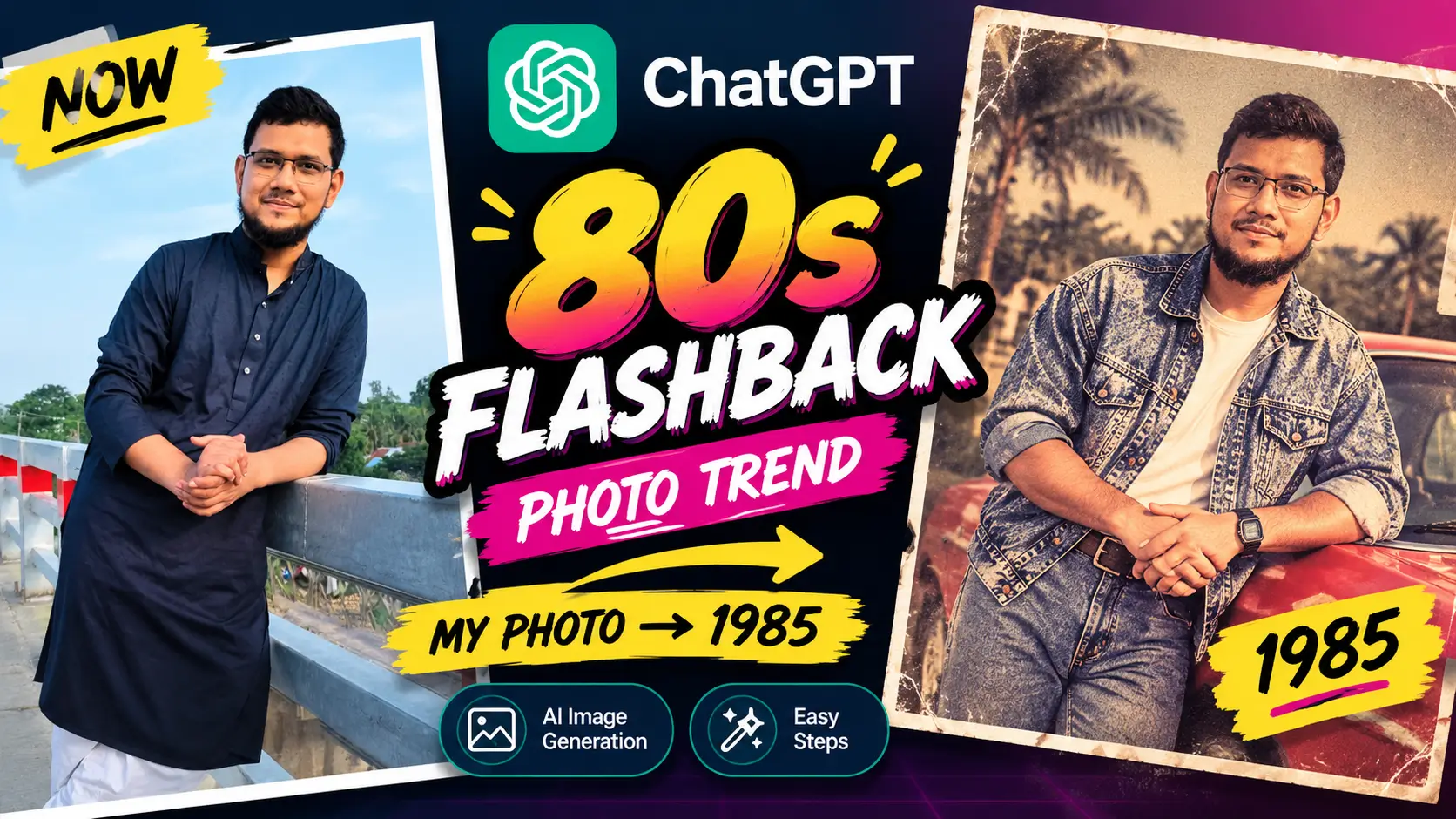
In this guide, I’ll show you how the ChatGPT 80s Flashback trend works, how to create your own image, what type of photo you should use, and how you can customize the final result.
What Is the ChatGPT 80s Flashback Trend?
The ChatGPT 80s Flashback trend is an AI photo transformation trend that turns a modern photograph into an image inspired by the 1980s. Depending on the photo and the generated result, ChatGPT can transform elements such as clothing, hairstyles, accessories, lighting, colors, background and overall photographic style to create a convincing retro appearance.
The effect is designed to make the image look as though it was taken decades ago, often using vintage colors, analog film grain, direct flash,
retro fashion and period-inspired surroundings.
Why Is the 80s Flashback Trend Popular?
One reason this trend has become so popular is that it is extremely easy to personalize. Instead of generating a random 1980s character, you can use your own photograph as the reference. That means you can see what you might have looked like around 1985 while
keeping your recognizable appearance as the starting point. The trend is also highly shareable. People can create their own versions and post them on Instagram, Facebook, TikTok, WhatsApp and other social platforms.
How to Create an 80s Flashback Photo in ChatGPT
Creating an 80s-style photo with ChatGPT is relatively simple. You can follow these steps from your phone or computer.
Step 1: Open ChatGPT
Open ChatGPT from your browser or the official mobile application. Make sure you are using a version that has access to the Images feature.
Step 2: Open the Images Section
Go to the Images section in ChatGPT. You should see different image-generation templates and styles. Look for the 80s Flashback template.
Step 3: Select 80s Flashback
Select 80s Flashback. ChatGPT provides the visual direction for the retro transformation, so you don’t necessarily need to write a long prompt yourself.
Step 4: Upload Your Photo
Upload a clear photograph of yourself. A photo where your face is easy to see generally gives the AI a better reference. You can use a portrait, selfie or another photograph where your appearance is clearly visible.
Step 5: Generate the Image
Submit the image and allow ChatGPT to process it. The AI will use your photograph as a reference and create a new image inspired by the 1980s. Depending on the result, you may see changes to your hairstyle, clothing, accessories, background, lighting and overall photographic appearance.
Step 6: Ask ChatGPT for Changes
If you don’t like the first result, you don’t necessarily have to start over. You can ask ChatGPT to make additional changes. For example, you can request a different hairstyle, another outfit, a different background or a stronger vintage film effect.
Do You Need a Prompt for the 80s Flashback Trend?
One of the useful aspects of the current ChatGPT Images experience is that the 80s Flashback template can provide the starting instructions for the transformation. However, you can still use additional instructions if you want a more
specific result.
For example, you could ask ChatGPT to create:
- A 1980s studio portrait
- A vintage family photograph
- A retro street photograph
- An 80s movie-style portrait
- A colorful disco-inspired portrait
- A vintage school photograph
Example 80s Flashback Prompt
If you want to customize the result further, you can use a prompt like this: Using my uploaded photo, show me what I would have looked like around 1985. Preserve my recognizable appearance and important facial features. Reimagine my hair, clothing, accessories and surroundings with unmistakable mid-1980s styling. Make the result look like a genuine vintage photograph with analog film grain, slightly faded colors,
direct flash and subtle softness. You can then modify the prompt according to the style you want.
Tips for Getting Better 80s Flashback Results
Use a Clear Photo
Start with a photograph where your face is clearly visible. Avoid extremely blurry images or photographs where your face is heavily obstructed.
Try a Different Photo
If the first result doesn’t look convincing, try another photograph. Different poses, lighting conditions and camera angles can produce noticeably different results.
Customize the Background
You can make the image more convincing by asking ChatGPT to place you in a period-appropriate environment, such as an old photo studio, 1980s street, bedroom, school or retro party.
Experiment With Clothing
Ask ChatGPT to experiment with denim jackets, vintage shirts, formal outfits, colorful 1980s fashion or other period-inspired clothing.
Can You Edit the Image After It Is Generated?
Yes. ChatGPT Images is designed not only for generating images but also for editing existing images. You can continue the conversation and ask for specific modifications instead of generating the entire concept again.
For example, you could say:
- “Change the jacket to a classic 1980s denim jacket.”
- “Give the image a stronger analog film effect.”
- “Change the background to an 80s photo studio.”
- “Make the colors slightly faded and warmer.”
- “Keep my face but change the hairstyle.”
ChatGPT Images 2.5 and the 80s Flashback Trend
The timing of this trend is particularly interesting because OpenAI recently introduced ChatGPT Images 2.5. The updated image system focuses on sharper details, faster generation, more precise editing and better preservation of subjects from reference photos.
OpenAI also introduced new image templates, editing capabilities and prompt-sharing features. The official announcement specifically points users toward a currently viral prompt for seeing what they might have looked like in the 1980s. You can learn more about the current image-generation capabilities in the official ChatGPT Images 2.5 announcement.
Watch the Full Tutorial
I also created a step-by-step video showing how I used ChatGPT to create an 80s Flashback photo from my own image. Watch the ChatGPT 80s Flashback Photo Tutorial on YouTube
More WhatsApp Tutorials From Sajidz Tech
If you enjoy practical technology tutorials, you can also check out these related guides from Sajidz Tech:
- How to Create a WhatsApp Channel in 2026
- How to Change WhatsApp Number Without Losing Chats
- How to Make WhatsApp Calls from PC in 2026
Final Thoughts
The ChatGPT 80s Flashback trend is a fun example of how quickly AI image generation is becoming accessible to everyday users. You don’t need professional photo-editing software or advanced AI skills to create a convincing retro transformation. All you need is a suitable photo, ChatGPT and a little creativity. Start with the 80s Flashback template, generate your first image and then experiment with different hairstyles, outfits, backgrounds and photographic styles. If you want to see the complete process, watch the video above and try the trend with your own photo.
Disclosure: AI-generated images can change details of the original photograph, including clothing, hair, background and some facial characteristics. Always review an AI-generated image before sharing it publicly.

www.555329.com
September 14, 2026
An Engaging Blog Post
peteapuestodigital
September 22, 2026
The digital betting space can feel a bit overwhelming but this platform keeps things straightforward and fun. I really appreciate how they handle transactions and keep the gameplay fair. It is rare to find a site that balances entertainment with reliability so well. peteapuestodigital
pornip.com
September 24, 2026
WOW,Very wonderful
pornip
September 27, 2026
The content is really great